WordPress backups you can count on.

Back up every file and the whole database of your WordPress site, restore it in one click and move it to a new host or address, right inside WordPress. Made by Code Boop, bought once, never rented.

Free for the first 5 backups · One price per website · No subscription

Code Boop WordPress plugins

Your website deserves a real backup

A website can disappear in an afternoon: a plugin update that breaks the site, a hacked admin password, a host that goes out of business or a mistake in the database. The only thing that brings it back is a recent, complete backup that you can actually restore.

Code Boop WP Backup puts every file and the whole database into one .zip with a single click, or every day or week on its own. Restoring is built to be safe: your current site is saved first, and if the database can't be loaded, the live site is left untouched. Moving to a new host or a new domain works the same way, and the address is changed everywhere, even inside widget and theme settings.

Most premium backup plugins renew every year. Ours is a one-time purchase per website, and the first 5 backups are free, so you can see a full backup and restore work before you pay. Want copies away from your server? Connect the plugin to Code Boop Backup & Restore on your Mac and keep them on your Mac, in Google Drive, iCloud Drive or Dropbox.

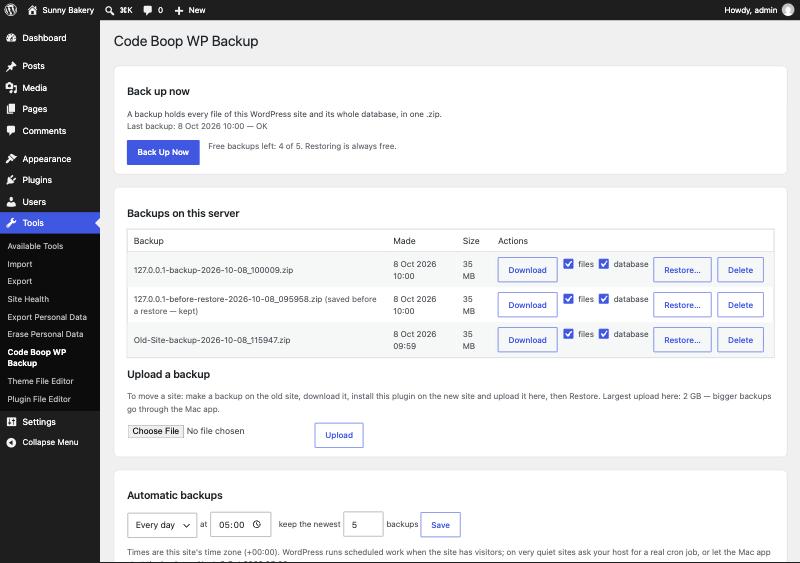
Files and database together

One .zip holds every file and the whole database, so a restore brings back the complete site, not half of it.

Safe restore

Your current site is saved before a restore, and a failed database load leaves the live site untouched.

Move to a new host

Restore on the new server and the address is changed everywhere, also in serialized settings. A different table prefix is handled.

On your own server

Backups stay in a protected folder with a random name on your own hosting. They are never uploaded anywhere unless you connect the Mac app.

Copies away from the server

With Code Boop Backup & Restore on your Mac, copies go to your Mac, Google Drive, iCloud Drive or Dropbox.
Pay once per site

No yearly renewal. Updates within your version are free, and the first 5 backups cost nothing.

The plugins

Install from a .zip in WordPress → Plugins → Add New → Upload Plugin. One license per website.

Questions about the WordPress plugins

Do I need the Mac app?

No. The plugin backs up, restores and moves your site on its own. The Mac app Code Boop Backup & Restore is only needed if you want copies on your Mac or in Google Drive, iCloud Drive or Dropbox.

Where are the backups stored?

In a protected folder with a random name inside your site's uploads folder, on your own hosting. With the Mac app connected, copies are also kept on your Mac and in the cloud storage you choose.

Will it work with my host?

It needs WordPress 5.6 or later and PHP 7.4 or later with the zip extension,, which almost every host has.

Can I move my site to a new domain?

Yes. Upload the backup on the new site and restore it: the address is changed everywhere, also inside serialized widget and theme settings, and a different table prefix is handled.

Is it a subscription?

No. You pay once per website and keep the plugin. The first 5 backups are free, and you get your money back within 30 days if you're not happy.