Code Boop Backup

Code Boop Backup

Your websites, safely backed up.

Daily backups of WordPress and other websites, saved on your Mac or in Google Drive, iCloud or Dropbox, with one-click restore and moving to a new host.

€29.90 One-time payment · tax included · 30-day money-back guarantee
one per computer

Free for 5 backups · macOS 13 Ventura or later · Apple Silicon and Intel

Free updates for this version · new major versions 50% off for owners

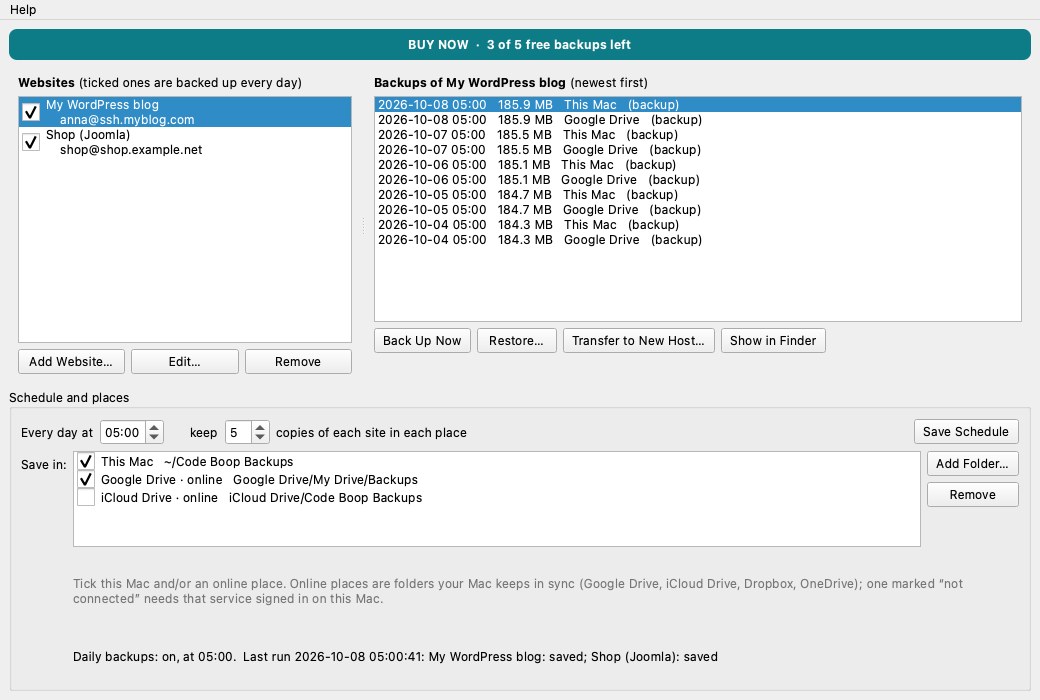
Code Boop Backup screenshot

Code Boop Backup copies your website every day: all its files and its database. It works with WordPress, Joomla, Drupal and any PHP or static site you can reach over SSH/SFTP, and finds the WordPress or Joomla database by itself. WordPress sites without SSH connect through the Code Boop WP Backup plugin with a key instead.

Choose where the copies go: on your Mac, in Google Drive, iCloud Drive, Dropbox or OneDrive, or several at once. If something breaks, restore with one click: the site as it is is saved first, so even a restore can be undone. Moving to a new host? It copies the site there and changes the WordPress address for you.

What it does

  • WordPress, Joomla, Drupal and any PHP or static site over SSH/SFTP
  • WordPress without SSH: connects through the Code Boop WP Backup plugin
  • All files plus the MySQL/MariaDB database, found automatically from wp-config.php
  • Saved on your Mac and/or in Google Drive, iCloud Drive, Dropbox or OneDrive
  • Runs every day on its own and keeps the number of copies you choose
  • Backups in parts of the size you choose: each new backup downloads only the parts that changed
  • One-click restore; the current site is saved first, so a restore can be undone
  • Move a site to a new host: files, database and the WordPress address
  • Passwords stay in your Mac's Keychain; backups never pass through our servers

Code Boop Backup: questions & answers

Which websites can it back up?

WordPress, Joomla, Drupal and any PHP or static website on a server you can log in to with SSH/SFTP. Most hosting plans include SSH; your host's control panel shows the address and user name.

Where are the backups saved?

Wherever you choose: on your Mac, and/or in a folder that syncs online such as Google Drive, iCloud Drive, Dropbox or OneDrive. Each place keeps the number of copies you set.

Do my files or passwords go through Code Boop?

No. The app connects straight from your Mac to your server, passwords stay in the Mac's Keychain, and backups go only to the places you pick.

Does every backup download the whole site again?

No. Backups are split into parts of a size you choose (100 MB to start with). The next backup downloads only the parts whose files changed, and the database only when it changed; unchanged parts are copied from the previous backup on your Mac.

Can I undo a restore?

Yes. Before a restore changes anything, the site as it is now is saved as a separate backup, so you can always go back.

Is it a subscription?

No. It's a one-time purchase, the first 5 backups are free, and restoring is always free, even without a licence.

Guides for Code Boop Backup

More apps